ColorPal
Interaction Design / 2023

ColorPal is a smart color tool for digital artists that seamlessly supports their creative process with the desired balance between automation and control.


ColorPal is a product concept developed at the School of Visual Arts in NYC for the MFA Interaction Design program. The design process involves co-creation with expert artists through unstructured interviews and workshops resulting in an intuitive and unique experience that addresses unmet user needs.
context
Type
Academic Project
(Fall 2023, 7 weeks)
Focus
Product/UX Design
Prototyping interactions
Scope
Research & discovery, Concept & testing, Design iterations, Hi-fi prototyping
Team
Fan Fang, Jihye Kim (Collaborators)
Wenting Zhang (Faculty Advisor)
Overview
problem
Choosing colors, experimenting and applying them in an artwork can be intimidating and laborious for aspiring digital artists.
significance
Systematically building artistic intuition and creative confidence
Choosing colors is an important aspect for any creative professional or visual artist. While some are experts at it and have an intuitive process for choosing colors, there are others who are still learning and struggle to create color palettes for their work.
ColorPal is an iPad application designed as a digital art tool for beginner or intermediate level illustrators to explore and experiment with color palettes and ease the laborious process of applying them to their artwork.
Solution

Designed to support artist's creative vision with subtle features to follow their natural experimentation process.
A smart color assistant for illustrators to generate color palettes and seamlessly apply them in their artwork.


balancing automation & control
A careful combination of human-created prompts, computer-generated suggestions and just the right balance between automation and control.
feature 1
Define Shapes
Auto-detect shapes for color blocking and smart gap detection feature for fine tuning shapes
addresses
→ Time-consuming color blocking
→ Editing shapes and masks


feature 2
Generate Palette
Based on visual and textual inspiration; a dynamic color preview to help users understand how colors are being generated and control the process.
addresses
→ Helps realize a creative vision
→ Mood board to color palette
feature 3
Explore Palettes
Explore suggested color schemes and variations; tweak palettes; and auto-apply to the artwork
addresses
→ Tweaking palettes, experimenting
→ Laborious reapplying process

Design Process
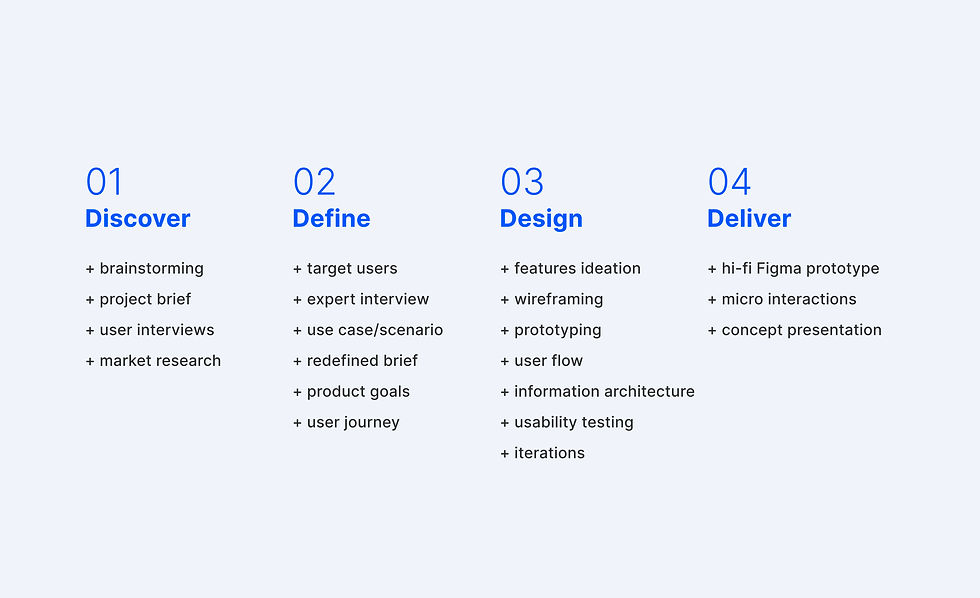
problem discovery

initial exploration
6 in-depth user interviews and defining a design opportunity
To explore design opportunities, we conducted six in-depth interviews with creative professionals across various domains and expertise levels. Our goal was to understand their creative process, how they use color, the tools they rely on, and the challenges they encounter. Through this research, we identified an opportunity to design a color palette generator and application tool for aspiring professional illustrators who are in the early stages of learning to work with color.

Journey mapping


Key Insights
research, synthesis & ideation

agile process
Prototyping and co-creating with an expert
After narrowing down our target user and use case, we delved into the user journey and deconstructed the artists' workflow. This deep dive helped us gain a detailed understanding of user needs and the broader product ecosystem. We then analyzed existing tools, conducted a competitive audit, and identified unmet needs. To validate our ideas early, we created low-fidelity static prototypes and shared them with experts. A co-creation workshop provided invaluable insights into the most valuable features for users.
design & prototyping

Solution Highlights


Reflection
take aways
-
Learned the user-centered design process to build all the way from big picture to detailed micro-interactions.
-
Gained confidence in prototyping tools and usability testing.
-
Realized the intricacies of user research for a software tool design that integrates smart technologies.