Float
Strategic Innovation & Product Design / 2022

Designing a desktop app that reimagines how employees engage in remote and hybrid workplaces to rebuild social capital post the pandemic.

x

A strategic design project sponsored by Braid It at the School of Visual Arts (MFA Interaction Design department). Our research into workplace meetings highlights widespread burnout and a lack of social interaction while working remotely. Float reimagines how teams engage, offering new ways for employees to connect, collaborate, and bond in virtual settings.
CONTEXT
Type
Sponsored Project
Start-up, B2B, AI solution
Role
Product Designer
New product concept and strategy
Scope
Generative research, Concept & prototype, User testing, Pitch deck
Team
Me, Tzuyi Lee, Nino (Product Designers)
Michael Dila (Founder & Advisor)
Criswell Lappin & Roger Mader (Faculty Advisors)
Overview
OPPORTUNITY we found
How might we facilitate casual interactions among employees in remote/hybrid workplaces and help companies rebuild their social capital?
Solution we built

An AI-driven desktop app to help medium and large companies rebuild their social capital.

⬅ Sound on
My role
Planned and conducted UX research
Led the research planning and collaboratively conducted desk research, market research, user interviews, usability testing, and more.
Collaborated for end-to-end design process
Collaborated with 2 other product designers to define the problem statement, conceptualize the new product, and iterative develop it through user testing and refinement.
Led presentation design
Planned the content for a 90 second product pitch to an expert panel during the final class session at the School of Visual Arts
Led client meetings
Planned weekly meetings with the sponsor/advisors and led the conversations with concise updates and questions for constructive feedback.
how it works
When companies make Float a part of their ecosystem,
They can provide their employees meeting spaces to have casual interactions and connect with each other.

In the Hall, employees bump into friends or make new ones.


It's like taking a walk in the office, you can know what people are thinking and talking about. Using AI we help employees who share similar interests or goals to cross paths and discover each other.
And as users walk around they can form “floats”.
Floats are temporary groups formed when 2 people start talking on the app, others walking by can choose to join.

It is unpredictable, and that’s what makes it unique.


Floats are live conversations. They depend on who is online at the moment and how the algorithm positions them in the space.
The app helps build a support system and a culture of helping each other.
It could be related to work or beyond that.

Asking questions and getting help is quick and easy.


Questions can asked in the Hall space and Float finds the most suitable co-workers to answer them. This creates a supportive environment while fostering new connections.
In this way,
Float rebuilds the sense of community and belonging in remote and hybrid workplaces.
Outcomes
1st place
Most potential product
For Strategic Design and Innovation Challenge (2022) at the School of Visual Arts, with 6 competing teams.
Pitch
Successful presentation
Our team presented a methodical exploration of new product ideas for the start-up, contributing to their research and understanding of users.
Strategy
Business x Design
The design process had a multi-disciplinary approach combining business strategy and user needs to find solutions that are desirable, viable and feasible.
Design Process
design challenge (given)
People think time is wasted in meetings. Using new technologies in AI and NLP, how might we improve individual and team performance in meetings?
Approach
1
Discover
Generative Research
Desk research
User interviews
2
Define
Define Opportunity
Affinity mapping
HMW workshop
3
Design
Concept
& Testing
Ideation
Concept testing
4
Design
Iterative Prototyping
Wireframes
Hi-fi design
5
Deliver
Final Design
User flows
Video & presentation
Process highlights
1. Generative research
With a broad approach, we inquired into the state of meetings and productivity in post-Covid workplaces with social, technological and economic lenses to uncover problem areas and unmet needs.
Desk research
News reports and government published statistics revealed that remote work continued to be a preferred way even post the pandemic and it was predicted to remain so. At the same time, it has been shown to negatively affect employee well being and productivity—affecting companies as well.
8 unstructured user Interviews
The first round of interviews was aimed at hearing first-hand about employees' remote work experiences. It included people from diverse fields and positions to uncover common problems, as well as choose a demographic to focus on.
4 focused user interviews
Our further research focused on junior employees as we found that they had been most affected by remote working. It is challenging for them to seek help, have exposure, and the growth that they wished for. Remote working felt isolating.

Excerpt from desk research notes

Transcripts and color coding

Affinity mapping
Emerging patterns post Covid-19
Insights from desk research

Remote working is the preferred way even after the pandemic
98 million people (54% of the workforce) in the US work remotely or in hybrid settings after the pandemic subsided. And remote working is a top three motivator for finding a new job. (McKinsey, March 2022)
However, leaders fear it.
47% leaders claim that relationship building is the greatest challenge and are worried that working in isolation can cause burn out and fray corporate culture. (2022 Work Trend Index Annual Report)
interpersonal relationships directly affect work and productivity
Insights from user interviews
"It was much easier to develop relationships in person, you just hang out and talk about random stuff, and you bond with that person; that you can't really have over a zoom call"
"I remember when I onboarded remotely, I couldn't get answers quickly, I wasted a lot of time waiting"
"There is less conversation because you can't just walk over to your friend's table and quickly ask something..."
Remote work has been linked to increased stress level, weakened relationships, and lack of growth opportunities - ultimately affecting well being as well as quality of work.
Instead of meeting efficiency,
we decided to focus on quality of interactions
Key themes we discovered

Employee Interactions
Lack of casual interactions limits opportunities for inspiration, support and growth.

Well-Being
Loneliness and isolation are the most reported concerns among remote workers.

Productivity
Current tools make remote work efficient. To improve productivity further, we need to help employees connect and bond.
2. Define Opportunity

Mindmapping

Ideal user experience

Parameters based on ideal experience
Market analysis
OPPORTUNITY statement
How might we facilitate casual interactions among employees in remote/hybrid workplaces and help companies rebuild their social capital?
Prioritizing new & junior employees
Defining target users

Primary User
Secondary User
Tertiary User
We focused on new and junior employees as that user segment was most affected by the lack of social interactions while working remotely. They were seeking opportunities to connect with co-workers and grow in their career.
Competitiors and product positioning
Deciding key differentiating features

Based on our research, we decided to prioritize the following user needs:
1. Provide opportunities for casual interactions
2. Helping junior and new employees connect with co-workers
These needs are unmet by many of the competitors (workplace meeting platforms), giving us an opportunity to create not just a desirable product, but also differentiate it in a competitive product landscape.
Why would companies invest in this?
Why are casual interactions so important for companies too?
❤️
Employees' well being
👩🏻💻
Improves productivity
🤝
Interactions across teams
💡
Fuels creativity and innovation
🌱
More growth opportunities
📈
Retains employees
Rebuilding social capital in remote and hybrid companies is crucial to help employees feel connected to the company and work better.
3. Concept Design & Testing

Ideation

Lo-fi prototype

User testing
initial idea & user feedback
Wireframes and lo-fi prototpye
User testing method:
Participants were given a scenario for context and then a task. They were showed specific screens and asked to think out loud—what they noticed on the page, what actions would they take, and what they expected next. For example, we tested: exploring and joining chats, browsing events, viewing people's profiles.
landing Page
Intent: Designed as a space for casual interactions where employees can connect with coworkers in their teams and beyond. They can move around, meet friends or new people and have small talks, forming floats.

"This map is not that useful"
What if I don't want other people to hear my conversation?
"What do floats, events and groups mean?"
How can I find my friends and people from my team?
Profile Page
Intent: Users can share what they like about themselves and pin their interests on their board—that could potentially be conversation starters and help build relationships across different teams and departments and eventually creating a sense of belonging among employees.

"I would not want to share too much personal information publicly"
"I would not want to add things manually, will this be synced with my social media?"
"I would like to see more job related info - what are they working on, which teams they are in..."
Other features we tested
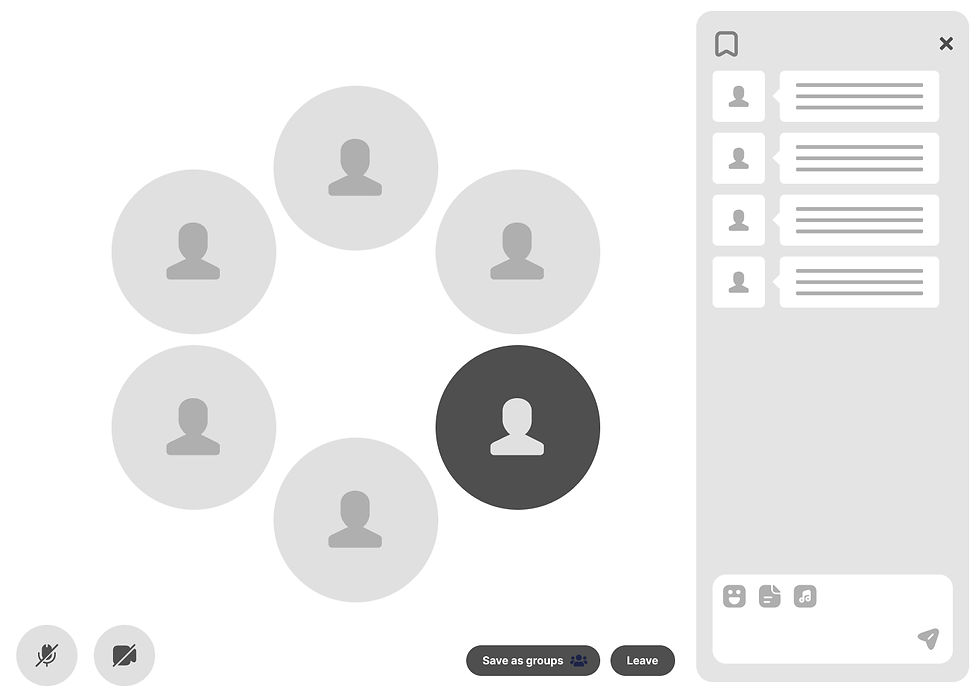
Float chat

Search

Groups boards
4. Iterative Prototyping

Multiple rounds of testing

Defining structure

Collaborating during design
Design developments after user testing
Refining the design iteratively (few examples)
Landing Page

Problems:
-
Users feel confused - who is in the space?
-
Users want to have team spaces
-
No option to choose a space
-
Navigation is not clear

✦ Intuitive Page Titles
✦ Users can choose a space

✦ Guiding first time users users

Scroll to view more >>>
profile page

Problems:
-
Users find it complicated to add interests
-
Too personal to share publicly
-
Users prefer to have more job related info

✦ Simplified and intuitive layout
New Design:
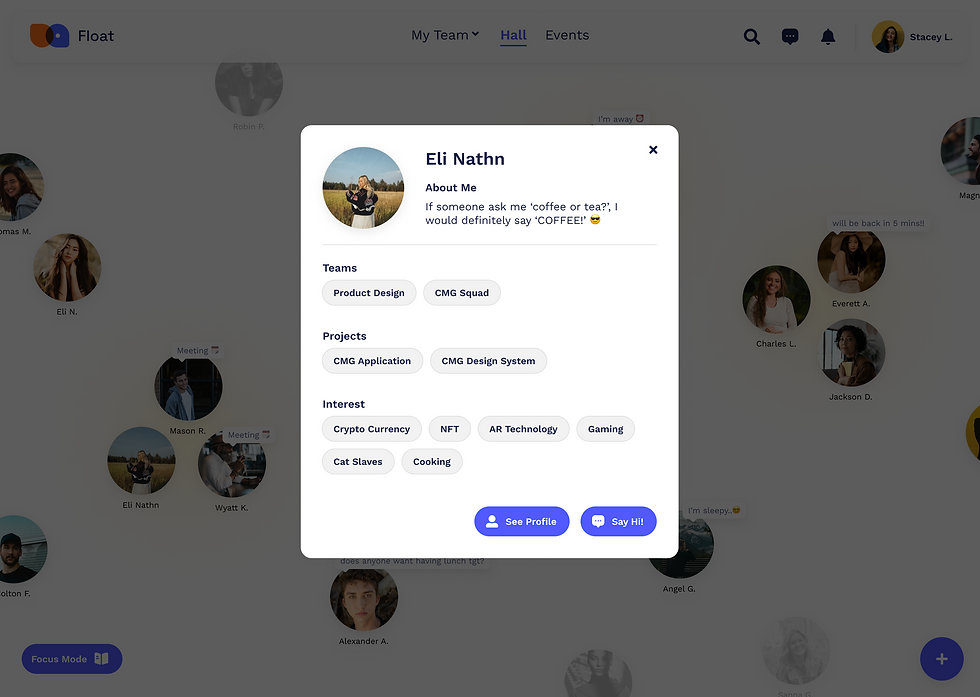
CLEAR ACTION BUTTONS
"Send message" starts a private chat
"Reply" to thoughts on personal board
SIMPLIFIED AND DESIRABLE CONTENT
-
Added work details in profile info
-
Profile created effortlessly by linking social media
-
Adding interest helps connect people
✦ Quick preview
Scroll to view more >>>
SIMILARLY WE REFINED OTHER KEY FEATURES
-
LIVE CHATS
-
EVENTS
-
BROWSE/SEARCH
These were key features we found necessary for an MVP based on user feedback. We eliminated some features to simplify the experience. We learned that to introduce fresh UI (not following conventional meeting platforms) we must simplify the product to essential features at first.
5. Final Design
Interactive Onboarding
Employees are invited to join Float via their company.
The conversational onboarding process introduces them to how Float works and helps them set-up an account seamlessly.

Explore and connect with coworkers
Employees can enter a common hall space, a personal group or a team space and interact with each other in a non-formal setting. Float makes conversations with new people easy and fun, and helps people with similar interests cross paths.

Coffee breaks and water cooler chats
Float facilitates those random, fun chats employees have when they bump into other. Temporary groups are formed when people online join a chat, they can be open for people passing by to join or be made private.
A support system
Asking questions and getting help is quick and easy. Using AI, Float finds the most suitable co-workers to answer them. This creates a supportive environment while fostering new connections.

Company wide events
Employees can browse and join events—to learn new things, socialize and network. This builds a sense of community and belonging, specially for new employees.

Reflection

Innovating with a vision that is shaped by a user-centered design process.
Discovering unmet needs and promising opportunities
Not all problem are voiced by users, it requires reading between the lines to discover unmet needs and wicked problems.
The value of early and frequent testing
By working on this project, I realized how valuable it is to prototype quickly during the early stages without obsessing over perfection. Putting the concepts in front of the users gave invaluable insights. It brought our focus to the most important features and helped make them intuitive.
The process is filled with unexpected discoveries and turns making project planning overwhelming, this experience helped me learn to embrace the ambiguity.
Embracing the non-linear nature of the design process